Comic Book / Pop Art
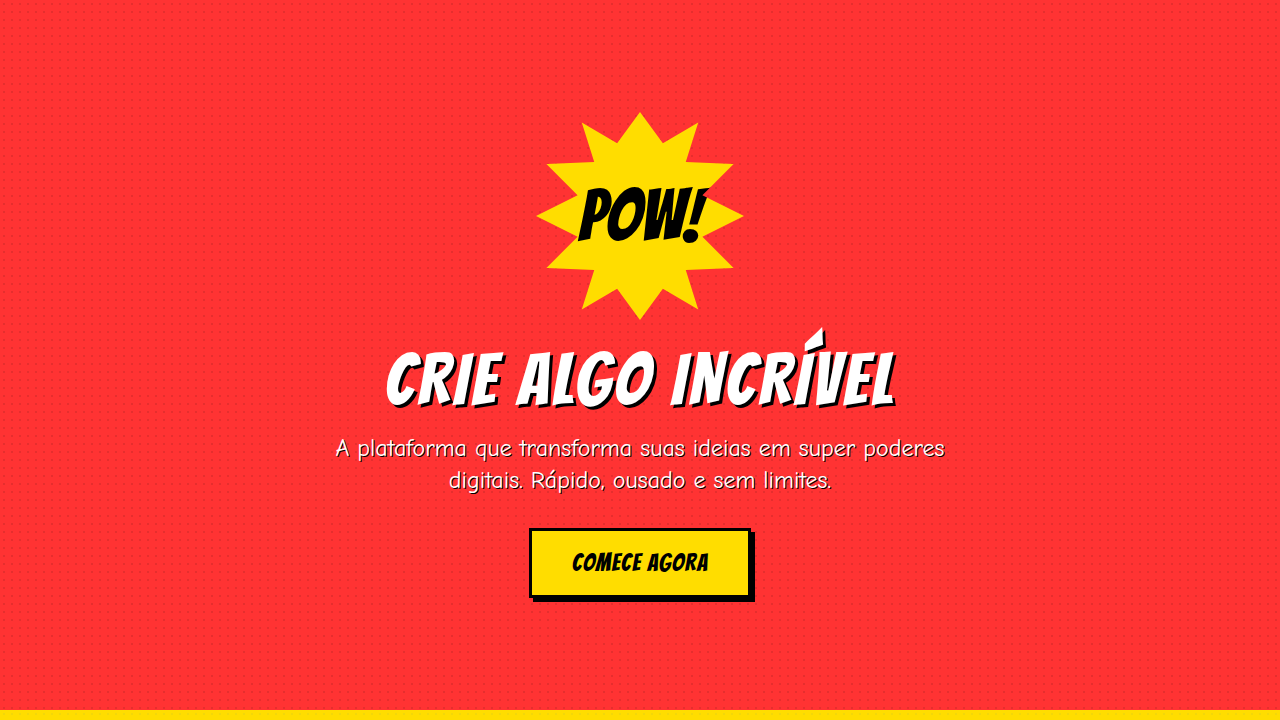
Comic book pop art interface. Ideal for landing pages, saas. AI-ready template.
Use case: Landing pages, SaaS
Historical Context
Comic Book / Pop Art style represents a modern trend in UI/UX web design focused on general.
Technical Specs
Colors
Primary
Effects
Flat comic lighting, heavy black shadows, no smooth transitions, bold hover (color shift), panel reveal animations, speech bubble pop-in
Light/Dark
✓ Full / ✓ Full
CSS
border: 3-4px solid #000, background: halftone pattern (radial-gradient dots), clip-path for burst shapes, font-family: impact/bold, color: primary (red/blue/yellow), box-shadow: 4px 4px 0 #000, speech bubble CSS
Variables
--outline-width: 3px, --dot-size: 4px, --dot-spacing: 8px, --yellow: #FFDD00, --red: #FF3333, --blue: #0066CC, --shadow-offset: 4px
Checklist
☐ Thick outlines present, ☐ Ben-Day dots visible, ☐ Speech bubbles styled, ☐ Burst shapes active, ☐ Primary colors bold, ☐ Panel layout sequential
DESIGN.md
Design System: Comic Book / Pop Art
1. Visual Theme & Atmosphere
Comic book pop art interface. Ideal for landing pages, saas. AI-ready template. Comic Book / Pop Art style represents a modern trend in UI/UX web design focused on general.
- Density: 5/10 — Balanced
- Variance: 7/10 — Dynamic
- Motion: 6/10 — Expressive
2. Color Palette & Roles
- Bright Yellow (#FFDD00) — Warning states, attention indicators
- Red (#FF3333) — Error states, destructive actions
- Blue (#0066CC) — Accent highlight, links and focus states
- Black (#000000) — Dark surface, primary background
- White (#FFFFFF) — Light surface, card backgrounds
3. Typography Rules
- Display / Hero: impact/bold — Weight 700, tight tracking, used for headline impact
- Body: impact/bold — Weight 400, 16px/1.6 line-height, max 72ch per line
- UI Labels / Captions: impact/bold — 0.875rem, weight 500, slight letter-spacing
- Monospace: JetBrains Mono — Used for code, metadata, and technical values
Scale:
- Hero: clamp(2.5rem, 5vw, 4rem)
- H1: 2.25rem
- H2: 1.5rem
- Body: 1rem / 1.6
- Small: 0.875rem
4. Component Stylings
- Primary Button: Subtly rounded (0.5rem) shape. Accent color fill. Hover: 8% darken + subtle lift shadow. Active: -1px translate tactile press. Font weight 600. No outer glows.
- Secondary / Ghost Button: Outline variant. 1.5px border in muted color. Text in primary color. Hover: subtle background fill.
- Cards: Subtly rounded (0.5rem) corners. Surface background. Subtle shadow (0 2px 12px rgba(0,0,0,0.06)). 1px border stroke.
- Inputs: Label above input. 1px border stroke. Focus ring: 2px accent color offset 2px. Error text below in semantic red. No floating labels.
- Navigation: Primary surface background. Active item: accent color indicator. Font weight 500 when active.
- Skeletons: Shimmer animation matching component dimensions. No circular spinners.
- Empty States: Icon-based composition with descriptive text and action button.
5. Layout Principles
- Grid: CSS Grid primary. Max-width containment: 1280px centered with 1.5rem side padding.
- Spacing rhythm: Balanced. Base unit: 0.5rem (8px).
- Section vertical gaps: clamp(4rem, 8vw, 8rem).
- Hero layout: Asymmetric composition.
- Feature sections: Asymmetric grid with varied card sizes. No 3-equal-columns.
- Mobile collapse: All multi-column layouts collapse below 768px. No horizontal overflow.
- z-index contract: base (0) / sticky-nav (100) / overlay (200) / modal (300) / toast (500).
6. Motion & Interaction
- Physics: Spring — stiffness 120, damping 20. Confident, weighted transitions.
- Entry animations: Fade + translate-Y (16px → 0) over 480ms ease-out. Staggered cascades for lists: 100ms between items.
- Hover states: Scale(1.03) + shadow lift over 200ms.
- Page transitions: Fade + slide (300ms).
- Performance: Only transform and opacity animated. No layout-triggering properties.
7. Anti-Patterns (Banned)
- No emojis in UI — use icon system only (Lucide, Heroicons)
- No pure black (#000000) — use off-black or charcoal variants
- No oversaturated accent colors (saturation cap: 80%)
- No 3-column equal-width feature layouts — use zig-zag or asymmetric grid
- No
h-screen— usemin-h-[100dvh] - No AI copywriting clichés: "Elevate", "Seamless", "Unleash", "Next-Gen"
- No broken external image links — use picsum.photos or inline SVG
- No generic lorem ipsum in demos
AI Prompt
Act as a Senior Frontend Engineer and Expert UI Designer. Your task is to code a complete Landing Page on the first attempt.
- Landing Page Theme:
- Sections to add:
Generate the final code immediately following these definitions:
Style
- Name: Comic Book / Pop Art
- Type: Bold, Colorful, Narrative, Pop
- Keywords: Sequential panels, speech bubbles, Ben-Day dots, thick ink outlines, jagged explosion bursts, halftone screens, heroic, bold, action
- Era: 1960s Pop Art
- Light/Dark: ✓ Full / ✓ Full
Color Palette
- Primary: Bright Yellow #FFDD00, Red #FF3333, Blue #0066CC, Black #000000, White #FFFFFF
- Secondary: Newsprint grain, halftone screens, flat color fills, limited secondary palette
Visual Effects
Flat comic lighting, heavy black shadows, no smooth transitions, bold hover (color shift), panel reveal animations, speech bubble pop-in
AI Visual Direction
Design a comic book pop art interface. Use: thick black ink outlines (3-4px), Ben-Day dot patterns, speech bubbles, jagged explosion bursts, sequential panel layout, bright primary colors, halftone screen effects, vintage newsprint aesthetic.
CSS Technical
border: 3-4px solid #000, background: halftone pattern (radial-gradient dots), clip-path for burst shapes, font-family: impact/bold, color: primary (red/blue/yellow), box-shadow: 4px 4px 0 #000, speech bubble CSSDesign System Variables
--outline-width: 3px, --dot-size: 4px, --dot-spacing: 8px, --yellow: #FFDD00, --red: #FF3333, --blue: #0066CC, --shadow-offset: 4pxImplementation Checklist
- ☐ Thick outlines present
- ☐ Ben-Day dots visible
- ☐ Speech bubbles styled
- ☐ Burst shapes active
- ☐ Primary colors bold
- ☐ Panel layout sequential
Execution Rules
- Strictly follow the defined visual style.
- Use high-quality inline SVG icons (Heroicons or Lucide style) — NEVER use emojis as icons.
- Add
cursor-pointerand smoothhoverstates (transition-all) on all interactive elements. - Required Page Structure:
- Navbar (Logo + Links + CTA)
- Hero Section (Impactful Headline + Subtitle + 2 buttons + 3D/Abstract visual element via CSS)
- Features (3 cards with icons)
- Testimonials (3 cards)
- Pricing (3 tiers, highlight the middle one)
- Final CTA
- Full Footer with social links, privacy policy, terms of use, contact and SEO links.
- All text content must be in English.
- The visual must be CLEARLY distinct — do not create a "default Bootstrap" design. Force the use of the provided design system variables.
- Use
<style>tags in the head for custom classes (especially for complex backdrop-filter effects and animations) that Tailwind CDN doesn't cover. - Full Responsiveness: Layout must adapt perfectly to Mobile, Tablet and Desktop (vertical stack on mobile).
- Include basic SEO, Viewport and Open Graph meta tags in
<head>. - Footer must contain: Copyright 2026, Secondary navigation links and Social media icons.
- Make the creative decisions needed to deliver the complete, functional result now.
Related
Last synced: 4/1/2026